
Which deck does a card belong to?
Shroom and Gloom uses a Combat deck for battles and an Explore deck for travelling through the dungeon and developing your cards. Start by identifying the phase and purpose of a card. A useful exploration tool and a useful attack answer different problems.
This reference covers selected cards visible in game imagery. It is a starting index for reading effects, not an exhaustive list of every obtainable card or its unmodified statistics.
Read the action, condition and properties separately
A card can contain an immediate action, a conditional effect and additional properties. On Roast, the attack is the immediate action; the fatal requirement controls whether it produces food. On Spark, the choice of exploration action and the Temporary property occupy different parts of the card.
Read the whole card before choosing a target. Also check its displayed cost and any uses counter. A current hand can include modified cards, so matching the name alone is not enough to conclude that two copies behave identically.
Pictured card examples
Scroll horizontally to view every column.
| Card | Pictured cost | Effect in the image | Properties shown |
|---|---|---|---|
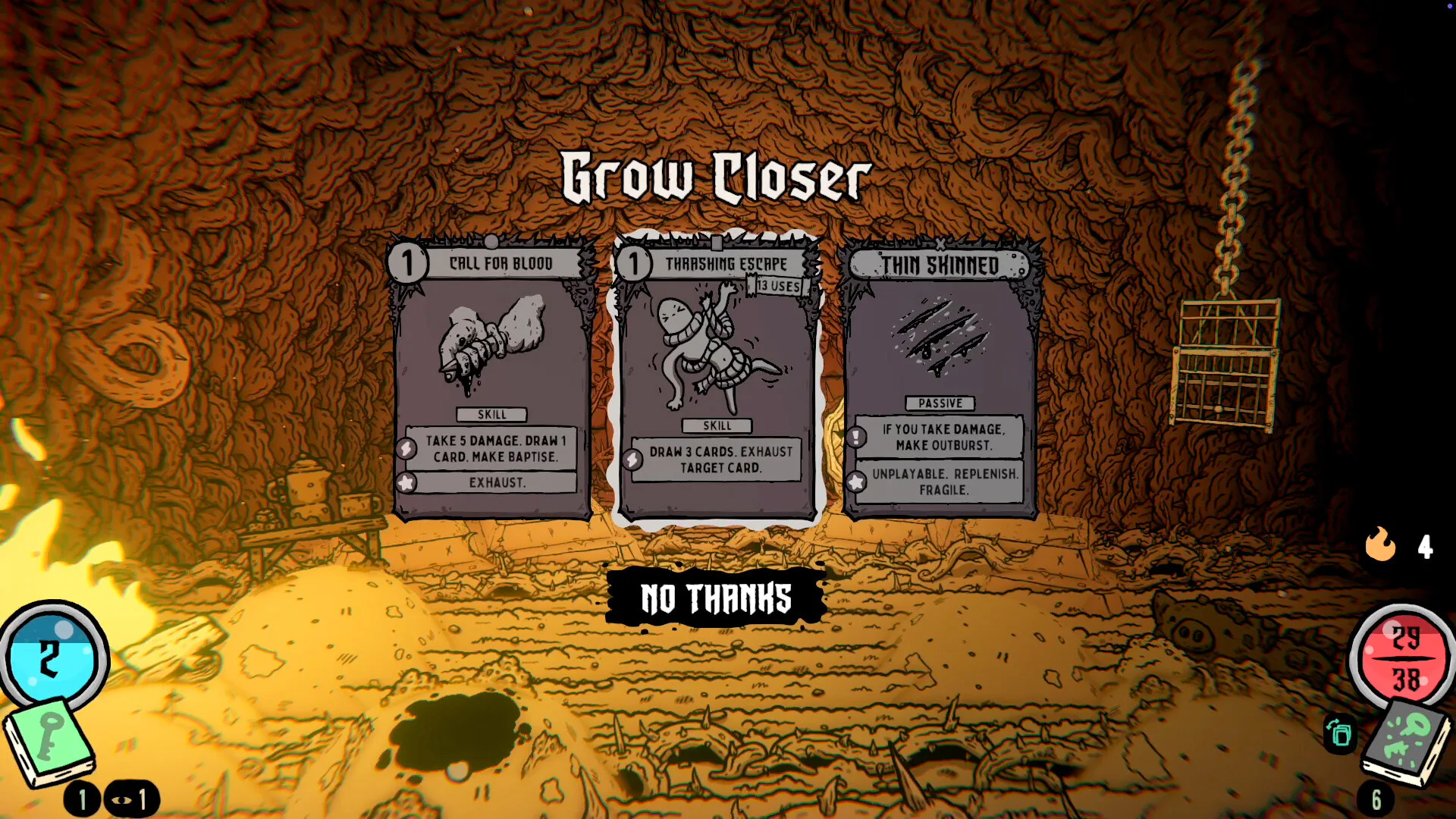
| Call for Blood | 1 | Take 5 damage, draw 1 card and make Baptise | Exhaust |
| Thrashing Escape | 1 | Draw 3 cards and exhaust a target card | The image shows 13 uses remaining |
| Thin Skinned | Unplayable | Taking damage creates Outburst | Replenish; Fragile |
Key: opening a lock
Key is shown as a Pick card with an unlock action followed by consumption. It also carries Handy. The visible wording makes it a clear example of why the result of playing a card and what happens to that card afterward should both be part of your decision.
Spark: reveal or ignite
Spark offers Reveal or Ignite and is marked Temporary. The available actions let you identify it as an exploration utility card. Check which action fits the target in front of you rather than treating every highlighted object as interchangeable.
Shovel: dig or break
Shovel is an Explore Skill with Dig or Break on its card. It is another example of an action choice: use the interaction that fits the object you are trying to work with. Keep an eye on the cost before committing to extra exploration.
Roast and Inferno: attacks that can create food
Roast has a fatal effect that makes Toasty. Inferno shows an attack against all enemies and a fatal effect that makes Hot Toasty. In both cases, the food-producing condition is part of the attack’s value.
The pictured Inferno reward also has an extra Gloom-damage offer above it. Read the reward prompt as well as the card; a number shown in a reward screen can have context that a cropped card image leaves out.
Call for Blood and Thrashing Escape: read the whole exchange
Call for Blood pairs damage to the player with card draw and creation of Baptise, and carries Exhaust. Thrashing Escape pairs drawing cards with exhausting a target card. These examples show why “draw cards” is not a complete description of the exchange.
Inspect the cost and target alongside the benefit. Do not assume that a label such as Exhaust has the same duration or return behaviour as a similarly named mechanic in another deckbuilder.
Thin Skinned: a conditional card effect
Thin Skinned shows a response to taking damage and has Unplayable, Replenish and Fragile properties. Its card is a useful reminder that some effects are triggered by events rather than selected as ordinary attacks.
Keep these card-level properties separate from your character’s starting Foresight. The launch characters each have a base Foresight in addition to their starting Combat and Explore decks.
Compare the card before and after growth
Card modification and growth are central to the game. When you improve a card, compare its new text with its previous state: what changed, what still costs a resource, and what condition must still be met?
A screenshot is useful for recognising a card and learning how to read it. Your current card is the reference for your next play. Treat these examples as a reading guide rather than a table of guaranteed starting damage.
Card changes that explain older recordings
Patch 0.6.39 revised several Facility cards and clarified cleaning descriptions. The changes below are a dated reference for understanding differences between versions. They are not a complete card database, and the patch does not establish an energy cost for every listed card.
Some adjustments affect what a card does after you draw or play it rather than its direct damage. In particular, a Temporary property and a change to linger can alter how long a card remains useful. Compare those properties alongside damage, healing and draw when revisiting an older combination.
Patch 0.6.41 also added a discard pile to the deck viewer. When the card you expected is not in your hand, inspect the appropriate pile before concluding that the reward was lost. Keep the displayed pile separate from a permanent unlock or a character’s starting deck.
0.6.39 card update reference
Scroll horizontally to view every column.
| Card | Announced change | What to compare |
|---|---|---|
| Sweep | Cleans for 1 | The cleaning amount |
| Flash Turret | Applies 2 Vulnerable and deals 2 damage | Debuff and damage separately |
| Analysis | Draws a Data card and no longer lingers | Draw target and hand behaviour |
| Melty / Gunk Pile | Now Temporary | Whether the card remains after discard |
| Shurikens | Persist 3; uses and Replenish removed | Duration rather than a remaining-uses counter |
| Stem Pack | Heal 5; draw 2; Bioheal 5; Exhaust | Recovery, draw and the Exhaust property |
Put the reference to work
For a first run, work through the basic guide alongside the cards you actually draw. Use the Soup and Foresight pages when you reach those systems.